• Please publish latest translation templates

    Unsolved
    1
    0 Votes
    1 Posts
    161 Views
    BigMikeB
    Hi, it would be very kind, if you published the latest translation templates for the current PowerArchiver 2023. So we could complete the translations for the current version. At the moment, at least the Windows 11 context menu and some items in the menus are not translatable at the moment. Kind regards
  • translations in installer

    Unsolved
    1
    1
    0 Votes
    1 Posts
    196 Views
    guidoG
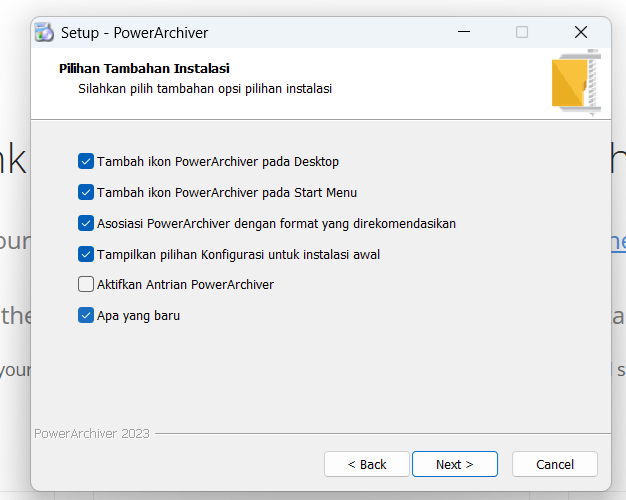
    I downloaded the lastest version and installed it. It started default with “vietnamese”. Strange… I changed trhis to english, but the 3rd stip was not translated [image: 1761035496205-a08345b8-5412-4255-9c58-66f4136ce310-image.png]
  • This topic is deleted!

    Unsolved
    1
    0 Votes
    1 Posts
    2 Views
  • This topic is deleted!

    Unsolved
    1
    0 Votes
    1 Posts
    2 Views
  • This topic is deleted!

    Unsolved
    1
    0 Votes
    1 Posts
    2 Views
  • This topic is deleted!

    Unsolved
    1
    0 Votes
    1 Posts
    6 Views
  • Some buttons in "Modern Look" are too small

    Solved
    3
    1
    0 Votes
    3 Posts
    2k Views
    BigMikeB
    The buttons in “Start” and “Werkzeuge” are fixed, but the button “Oberfläche” in the “Ansicht” toolbar is still too small in version 19.00.51 And there are also some additional glitches in the dark version which don’t appear in the bright ones: [image: 1564831535360-c6b52f68-0826-4615-87be-e278ba1ac62a-image.png] [image: 1564831637072-a7b0a3a3-a2a1-48f8-b48e-25eda7283190-image.png]
  • Some Strings in PowerArchiver 2019 are not translatable

    Solved
    3
    1
    1 Votes
    3 Posts
    2k Views
    BigMikeB
    No problem, send me the updated resource file and I’ll translate the rest :)
  • %APPNAME% should not contain the version

    Unsolved
    10
    1
    0 Votes
    10 Posts
    7k Views
    BigMikeB
    @spwolf It’s not pretty on your side to implement - and it’s not pretty on my side to work with, if I don’t know how the string will finally look in the application. I can’t imagine a good and easy way to keep track of the handled strings. I mean I don’t know if all of them are still used in the application and where they are used. So basically I would need to report all strings if I find one in the application (wrong for sure) and everytime I find one in the translation (maybe wrong, maybe already handled - which can only be checked by you). And not only me, but also any other translator and user. But on the other hand, changing it in my translation file will only change the German translation of PowerArchiver, changes done by you will correct all localized versions. It will be pretty easy to keep track of the changed strings, if I make them in the localization, as they appear in the category “Problems/Warning”, in case I replace %APPNAME% by PowerArchiver. That would be easy for me, but doesn’t help for other translations, until you look into the translation files and adapt the other translations (or ask the translators to do so). Your decision…
  • let's introduce ourselves !

    Unsolved
    8
    1
    1 Votes
    8 Posts
    9k Views
    N
    @mallet Same here maller!
  • German Translation

    Moved
    20
    0 Votes
    20 Posts
    38k Views
    BigMikeB
    Ok, I’m waiting until the files are ready. Send me the files, when they are complete.
  • PA2017 translation issues

    Unsolved
    4
    0 Votes
    4 Posts
    7k Views
    spwolfS
    @joakim_46 said in PA2017 translation issues: Sure. I will gladly help you with the Portuguese (Portugal) translation. Just feed me the info, and I will gladly help. I can start right now with that one I have reported. This product is licensed to: -> Este produto está licenciado para: I will email you translation file and tools in next few days… thank you!
  • Danish Translation

    2
    1 Votes
    2 Posts
    5k Views
    S
    [image: 1482096475924-upload-83e480d3-2ace-4379-86f9-707fdbe5179a.png] Excellent article plus its information and I positively bookmark to this site because here I always get an amazing knowledge as I expect.
  • PowerArchiver 2015 Toolbox License Transfer

    Moved
    3
    0 Votes
    3 Posts
    9k Views
    L
    @spwolf: yes of course, just contact us at support at conexware dot com and we will handle it… thank you! Thank you very much! :)
  • Saying Hello

    Moved
    2
    0 Votes
    2 Posts
    6k Views
    M
    welcome Michealyardy!!!
  • Polish translation

    Moved
    2
    0 Votes
    2 Posts
    12k Views
    N
    polska pany !!! :)
  • Errors in Brazilian Portuguese translation

    Moved
    7
    0 Votes
    7 Posts
    21k Views
    alexgiegA
    Hi! I’ve just tried the pt_BR translation again in v13.02.02 and found some bugs in the Option/Security tab. Instead of “Security”, the tab name to the left says “(lento)” (“(slow)”). The top middle tab says “Nenhum” (“None”), and the top right bar says “1 passo - US DoD 5220.22-M” (“1 step…”). See the attached screenshot to see what I mean. Also, there are a few untranslated strings spread around, both in other tabs as well as withing the Security one, such as the “Password Profiles” title visible in the screenshot. Maybe that’s related? I hope this helps! [image: attachment_p_30006_0_pabug.png]
  • Spanish translation

    Moved
    10
    0 Votes
    10 Posts
    24k Views
    P
    Hi Wepver, are you sure that PA does not integrate with WinRAR?? I don´t have any problems with it…
  • Indonesian native language translation…

    Locked Moved
    10
    0 Votes
    10 Posts
    29k Views
    M
    Is there any seat left in the boat if I want to help? I might be able to complete and proofread the translation for GUI part.
  • How to translate

    Moved
    8
    0 Votes
    8 Posts
    20k Views
    MickeM
    @rasin: on this page is no instructionse to translate. Have you read this on the page? If you are interested in helping to translate PowerArchiver into your language and it is not already available, please contact us. Kind Regards Micke