• PGP Keys

    Unsolved
    3
    0 Votes
    3 Posts
    2k Views
    B
    Thanks, I appreciate that
  • How to translate PowerArchiver?

    Solved
    3
    0 Votes
    3 Posts
    3k Views
    B
    google
  • Power Archiver portable requires admin to run

    Solved
    4
    1 Votes
    4 Posts
    3k Views
    spwolfS
    @aluminumhaste re-download and try again please… it has admin requirement removed from the “installer”… so lets see how it works on your computer now.
  • 18.00.48 keeps opening text file in notepad!!

    Unsolved
    8
    0 Votes
    8 Posts
    6k Views
    Brian GregoryB
    @ckit Thanks, I’d forgotten about that setting. Changing that one to Notepad++ does allow me to use Notepad++ as the viewer. But why the two possible ways of choosing the viewer? Maybe the one in Settings should be the default but the one in the View dialog is completely non functional at present!
  • Fast Ring: PowerArchiver 2018 18.00.41/43/44/45/46/48

    Locked
    12
    4 Votes
    12 Posts
    15k Views
    spwolfS
    @Alpha-Testers updated to .48 via Patchbeam, all changes in the Whats New above.
  • office icons shown twice in config> interface

    Solved
    7
    0 Votes
    7 Posts
    8k Views
    spwolfS
    @luxor said in office icons shown twice in config> interface: Only the one “Office icons” showing now. But should that be there at all, going by your original reply to me. @spwolf said in Duplicate skin.: @luxor shouldnt be there at all since these are toolbar icons. yeah, that requires a bit more work, we need to add some new options to that config screen. I will write it up for later releases.
  • Configuration bug in relelase version of 2018

    Solved
    6
    2 Votes
    6 Posts
    4k Views
    spwolfS
    @the_purspyk said in Configuration bug in relelase version of 2018: Seems to be working. Some small observations, during the installation, I dont selelct any of the option ie add items to Start Menu, but PowerArichiver is always added to the Start Menu (this has happened in all versions of the program, and i have mentioned this before). If the program is registerted, would it not be possible to remove the Register Icon from the toolbar. I got the impression initially that my program had not been registered, or grey it out. we will write it up, thanks. As to the register icon, it is under Options in Modern toolbar. You might want to change the settings, upgrade to other version, etc, thats why it is there… otherwise PA clearly states it is registered in about window and unregistered is removed from the caption.

  • Password policy: Negative length

    Solved
    4
    1
    1 Votes
    4 Posts
    3k Views
    BigMikeB
    I can confirm, that it’s working as expected now :-)
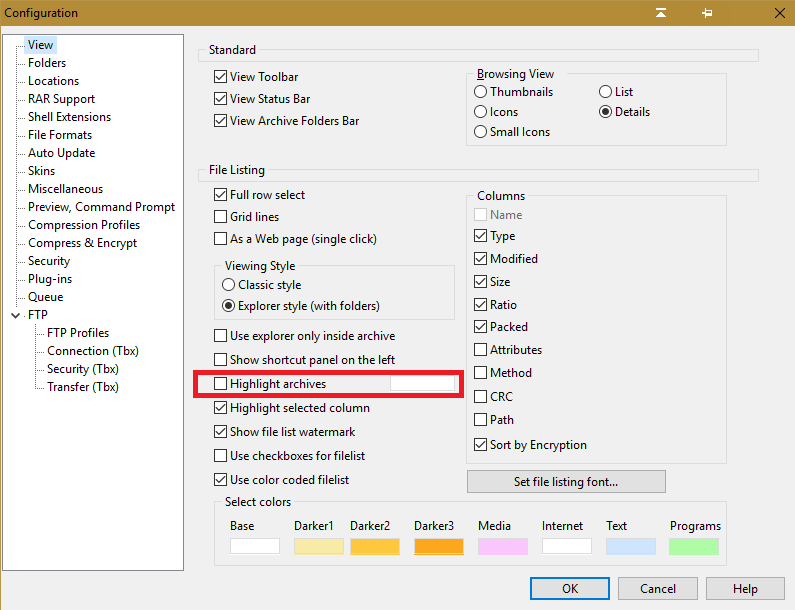
  • Option to highlight archives not working

    Solved
    5
    1
    2 Votes
    5 Posts
    4k Views
    BigMikeB
    I can confirm, that it’s working as expected now :-)
  • Ugly folder name for settings

    Solved
    4
    0 Votes
    4 Posts
    3k Views
    BigMikeB
    I can confirm, that it’s working as expected now :-)
  • Cannot perform simultaneous archive options

    Solved
    3
    0 Votes
    3 Posts
    2k Views
    J
    @spwolf said in Cannot perform simultaneous archive options: To create separate archive of each file selected, there is Batch-Zip option if user clicks on files> PowerArchiver> Batch-Zip. This will start Batch Zip tool which will by default create separate archives (and there are more options too). Thanks! I think this is what we need. Thanks for the tip!
  • PA 18.00.41 and Start Menu

    Solved
    6
    1
    1 Votes
    6 Posts
    5k Views
    spwolfS
    @Brian-Gregory so in one of the latest versions we now clean up old program group, rename it to PowerArchiver and also delete old shortcut to PA 2017. So now when you upgrade from 2017 to 2018 all is nice and proper on Windows 7 and earlier system. Thanks!
  • ConeXware Update

    Solved
    3
    0 Votes
    3 Posts
    3k Views
    spwolfS
    text has been updated since PA 2018 has arrived on slow/fast rings of PA 2017… thanks!
  • 18.00.46, the most minor bug possible

    Solved
    10
    0 Votes
    10 Posts
    8k Views
    spwolfS
    @drteeth thanks for letting us know.
  • pbs files with many empty lines

    Unsolved
    6
    1
    0 Votes
    6 Posts
    5k Views
    pirrbeP
    @mili two examples in support mail. Np.
  • Unable to select correct viewer

    Unsolved
    2
    2 Votes
    2 Posts
    2k Views
    M
    thanks @drteeth Indeed, there is an issue there and we have logged it in for fixing
  • maybe add a minimum size

    Solved
    5
    1
    0 Votes
    5 Posts
    10k Views
    spwolfS
    @guido said in maybe add a minimum size: Better, but maybe a little bit bigger? [image: 1522148510122-a2757d97-9d66-4b85-9586-91eae4e364a6-image.png] it is a problem with safe mode, gotta be able to use it under lowest resolution, so minor glitches like that will have to happen.
  • [Bug] PA 2017 17.00.63 Automatic installation

    Solved
    7
    1 Votes
    7 Posts
    5k Views
    spwolfS
    @mili @cmmpc this was fixed in PA 2018, likely few months back… thanks!
  • PA 2018v32 "BURNER" - save dvd to iso app doesn't detect CD writer...

    Unsolved
    16
    2
    1 Votes
    16 Posts
    15k Views
    spwolfS
    @pirrbe said in PA 2018v32 "BURNER" - save dvd to iso app doesn't detect CD writer...: Media used is indeed RW (tried Cd and DVD). I could burn and add files afterwards (RW). The format is UDF. When I insert that DVD using SH soft, no problem. I still can add files on it. When trying out this with PA Burner, it’s going wrong. No active ‘Burn’ button, incorrect counters, etc… The first problem was that the external writer was not recognized by PA. That has been fixed, but still not operational. Explorer index : [image: 1521752382256-baf1622a-e4ab-4082-9934-fe175aede3b8-image.png] PA index : [image: 1521752483181-8d65685e-fc16-4ac8-b737-2ed23811a6d3-image.png] I hope this is not an isolated local problem. yeah, that looks like Burner is not recognizing your disc as writable one. Did you try checking use last session checkbox? I will try with some DVD-RWs I have, I burned some CD’s and DVDs but of normal R kind over the weekend.
  • Error when pressing burn

    Solved
    4
    1
    1 Votes
    4 Posts
    3k Views
    guidoG
    seems to be fixed.