• glary Utilites does not recognise powerarchiver inbuilt update

    Unsolved
    1
    0 Votes
    1 Posts
    2k Views
    D
    Wrong version on Glary Utilities software update check, even if i have newer version installed. i have to install version from website not inbuilt powerarchiver update check to get rid of mglary utilites notifcation of powerarchiver update
  • File search not work for unicode chars and not work in subfolders

    Unsolved searching function
    4
    1 Votes
    4 Posts
    4k Views
    M
    Thanks very much @lbren We have noted all of your suggestions and have logged them in for the dev team to see once they start working on it.
  • PA 18.00.53 tab opening

    Unsolved
    13
    0 Votes
    13 Posts
    13k Views
    spwolfS
    @drteeth said in PA 18.00.53 tab opening: Hi spwolf, No worries about the late reply. As for your problem with many tabs, just have a “close all” option. What about my request to be able to use a mouse’s forward and back buttins to navigate the archive? I always press my back button first by instinct and only then realise that I have to use the cursor and my left mouse button. I look forward to the tab enhancements. Cheers DrTeeth opened up a new thread about that: https://forums.powerarchiver.com/topic/5984/move-back-and-forth-via-prev-next-buttons-in-archive-folders
  • Fast Ring: PowerArchiver 2018 18.00.50/53/56/57

    Locked
    5
    2 Votes
    5 Posts
    8k Views
    spwolfS
    @Alpha-Testers small update to .57… thank you!
  • Tabs, empty windows and extra closing.

    Unsolved
    9
    3
    0 Votes
    9 Posts
    8k Views
    spwolfS
    @bigmike said in Tabs, empty windows and extra closing.: @spwolf said in Tabs, empty windows and extra closing.: But good idea about something there if user is not using/browsing hdd? Maybe MRU archives? Or output from favorite archives window? @Alpha-Testers - i know @Brian-Gregory is using classic with folders, maybe he can give some input? How will this work with your proposal here? 1st tab on opening with no arguments: Files and folders/folder pane shows “My PC” 1st tab on opening with archive: Archive content/folder pane shows archive folder structure opening an archive will open a new tab, folder pane shows archive folder structure opening a new tab by (+) will show MRU list/Favorites? On the first guess, I would vote for “Favorites” to fill the empty pane :-) Probably, that will make it pretty confusing for the standard user… But the pane should never be empty. That is confusing, too. Maybe restricting browsing “My PC” to explorer mode and using folder pane in archive mode consequently for Favorites/MRU and for archive folder structures, in case an archive is open, is smarter. both folder panel and browsing hdd in archive mode are optional features, default is that there is no folder panel and there is no hdd browsing in archive mode. So i dont think it will be too crazy for pro users… and it is useful for sure.

  • Folder navigation not working correct in archive view

    Solved
    14
    1
    1 Votes
    14 Posts
    14k Views
    BigMikeB
    This sounds really good :)
  • Alt+Enter in Modern Toolbar?

    Solved
    11
    1 Votes
    11 Posts
    12k Views
    spwolfS
    @brian-gregory said in Alt+Enter in Modern Toolbar?: What is ALT-Enter supposed to do? It always used to be full screen toggle in the old days which is now F11. properties window… before it did not work in modern, also shortcuts were quite random.
  • GUI: Uppercase

    Unsolved
    2
    1
    1 Votes
    2 Posts
    2k Views
    C
    Select Folder display Style could be corrected too
  • GUI: multi extract- Alignment

    Unsolved
    2
    1
    0 Votes
    2 Posts
    2k Views
    guidoG
    [image: 1528972414788-185246e6-3873-4136-9dd3-c6ef19fc8e3c-image.png] text is cut off
  • Sorting broken in all views but details view

    Solved
    9
    1
    1 Votes
    9 Posts
    9k Views
    spwolfS
    @bigmike said in Sorting broken in all views but details view: I can confirm, that this problem is fixed here in 18.00.56. Thank you. thanks for reporting it!
  • GUI: Frame cut off

    Unsolved
    2
    1
    1 Votes
    2 Posts
    2k Views
    M
    thanks @guido added this one to an existing issue logged in regarding cutoff frames.
  • Pressing tools buttons restarts app

    Unsolved
    5
    1
    0 Votes
    5 Posts
    4k Views
    spwolfS
    @darthpingoo said in Pressing tools buttons restarts app: @spwolf Are you planning to implements Ribbon in FTP/Backup/Burner tools too? We cant do it in main PA GUI, since we cant hide individual ribbon ui components, this is technology limitation of Microsoft Ribbon UI SDK that we use for ribbon. So people who bought Standard and Professional licenses, and also our Enterprise users that hide those from their own users (most of our Enterprise users limit this functionality as security measure), would have Backup, Burner and FTP always there which would be very annoying for them. edit: if you thought it pabackup.exe, paburner.exe, etc, yeah, it is possible to do it there in the future. We have to have both options since Ribbon UI is only available from Windows Vista & 7, so our Windows XP users still need to have classic interface option.
  • FTP: Tooltip

    Unsolved
    2
    1
    0 Votes
    2 Posts
    2k Views
    guidoG
    Turns out it’s applies to all buttons except for “Passive”
  • Backup: a few things

    Unsolved
    2
    2
    1 Votes
    2 Posts
    2k Views
    M
    makes sense, logged in. thanks @guido
  • Configure Clouds: GUI

    Unsolved
    1
    1
    0 Votes
    1 Posts
    1k Views
    guidoG
    [image: 1527766601917-0111feb5-ce03-4c51-9035-52279e44bb2a-image.png] See image
  • Unknown Button in customize classic toolbar menu

    Solved
    6
    1
    1 Votes
    6 Posts
    5k Views
    S
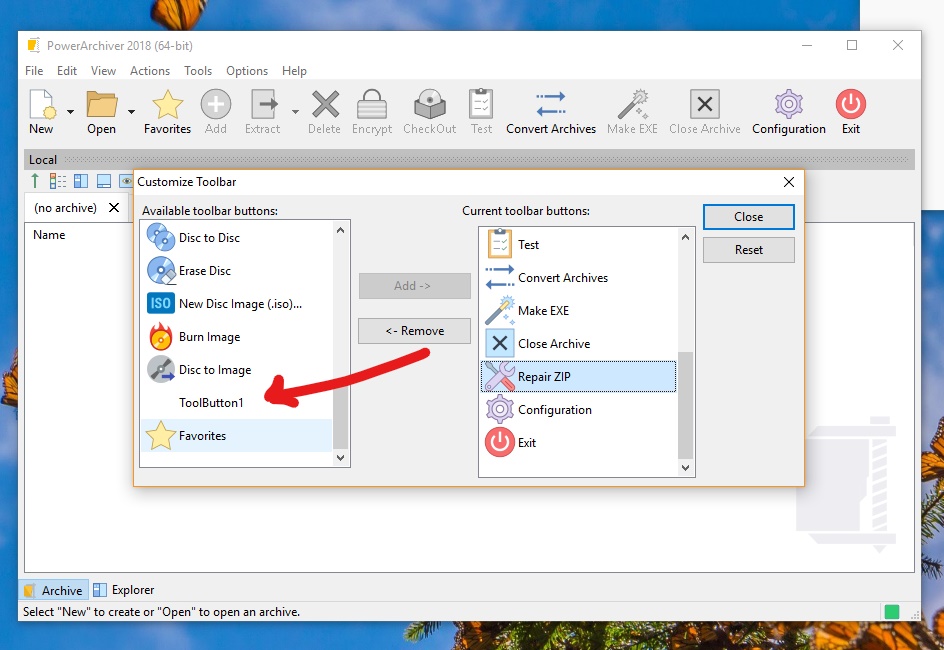
    The Most Important of them is the Windows Explorer delay that shell extension causes.
  • The Dark Mod .PK4 (renamed zip files) files open, but CRC errors on all files.

    Solved
    2
    1 Votes
    2 Posts
    2k Views
    M
    How did you extract? I was able to open the file via PowerArchiver, click on Extract, picked a folder and it extracted there fine. Using version 18.00.53
  • PA Favorites Window: Column settings not saved

    Solved
    3
    2 Votes
    3 Posts
    3k Views
    M
    The favorites dialog will now save column settings in version 18.00.50 https://powerarchiver.cachefly.net/2018/powarc180050.exe Thanks @BigMike
  • PA Backup window doesn't match Archive + Explorer window

    Solved
    3
    1 Votes
    3 Posts
    3k Views
    M
    the Icons will now show up as Original when clicking on the Backup Tab while using Original icons. https://powerarchiver.cachefly.net/2018/powarc180050.exe Tooltips fix coming up. Thanks @BigMike
  • Modern Icons Dark Theme

    Solved
    5
    1 Votes
    5 Posts
    4k Views
    spwolfS
    [image: 1526291996370-skins-icons-4.gif] here is small tutorial :)