




Add file selection window bug
-
Has anyone noticed a problem with the add file selection window, where the first file listed in the selection window is barely visible? Open a zip file, select “Add”, and look at the files listed in selection window.
I’m running PA 14.05.04 on Windows 7 x64 Professional.
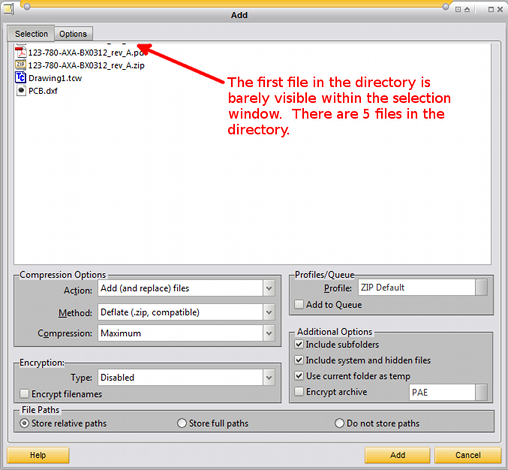
-
Confirmed here, with both the default classic and MyPA skin.
-
Tested in Windows 8.1…this is how I now see it.
Good catch…:D
-
I cannot duplicate this, at least in in Windows 7.
How odd. At the same time, I have a problem no one else seems to have.
-
Confirmed here as well!
Mine looks just like moles42’s screenshot too! -
good catch, there is new build coming today/tomorrow so this is perfect timing.
-
Maybe I am looking at the wrong place. (See attachment). I do not seem to have this problem (running latest build).
If I am not looking in the wrong place, I wonder if my not having this problem is my connecting to having unduplicatable problems with AC?

-
Hey Socrates,
this happens when an archive is open, simply click the add files button and it will show as in screenshot.
-
I cannot come up with any way to duplicate this. Must be some way I never use PA.
Not to worry.
Have a good day.
-
I cannot come up with any way to duplicate this. Must be some way I never use PA.
You’re using the advanced add window and the problem doesn’t appear there.
If you go to configuration>miscellaneous and deselect “Enable advanced add window” Then try it you will most likely see what we are seeing. -
Good. I suspect you are right. That is doubtless why I cannot see it. I have used the advanced add window from the beginning.
Thanks.
-
Interesting… you guys are more useful than a help manual :)
-
-
Thanks for the quick feedback guys. Nice to know it wasn’t just me :D
-
A deserved cold one for everyone!

-
Please update to latest version via Patchbeam, it should work fine… thank you!
-
Please update to latest version via Patchbeam, it should work fine… thank you!
Looks fine here. :cool:
-
It appears fixed for me. Thank you!
-
confirmed !
-
I’m still having the issue even though I have the latest release (at least according to help). When I try to add files to a .cab archive it shows me “My Documents” folder but I can’t navigate to anywhere else on my hard drive. There used to be a button that would allow you to change the folder or go up a level. It’s gone as of yesterday.
